Add KYC checks after referencing

If you use our Know Your Customer checks but didn’t request a right to rent, enhanced ID or AML check as part of the initial referencing process, you’ll now be able to add a check any time up 21 days after all other reference checks are complete.

To add a check, click on the applicant’s name when you expand Step 2 of the tenancy from your Dashboard. 

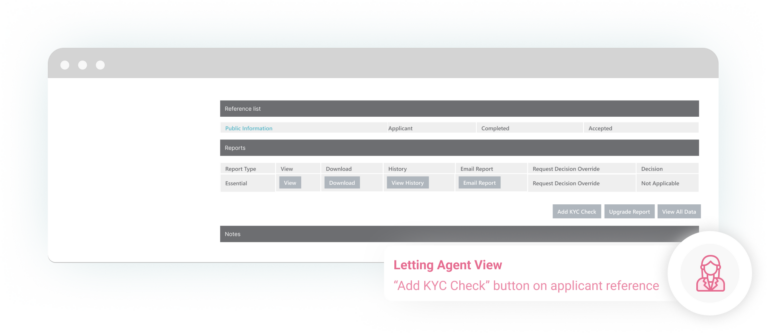
In the ‘Reports’ section of the applicant reference page, click the ‘Add KYC Check’ button.
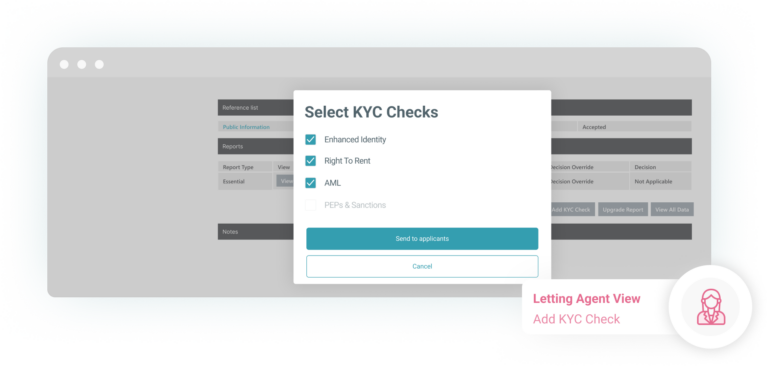
Select which checks you wish to add and click ‘Send to applicant’. The applicant will receive an email to provide the additional information requested and/or complete the online identity verification process.
As soon as the checks have been completed the new KYC reports will then be available to view or download within the ‘Reports’ section.

Are you boxing clever yet?

Book a demo

Find out how BOX can help you save time, reduce admin and let properties faster.

    Fill in your details below and we’ll be in touch shortly to arrange the best time show you how we can give you more time to focus on what you do best whilst Box takes care of the rest.

    Thanks for your interest. If you need some help with your referencing or other services, please check out the Tenants area of our website here. If you still need some assistance, drop us a message and our Tenant Support team will be happy to help.

    Thanks for your interest in Box. If you need some help with your insurance policy or other services, our Landlord Support Team will be happy to help. Please call us on 0345 450 9903 or send us a message.

    Next