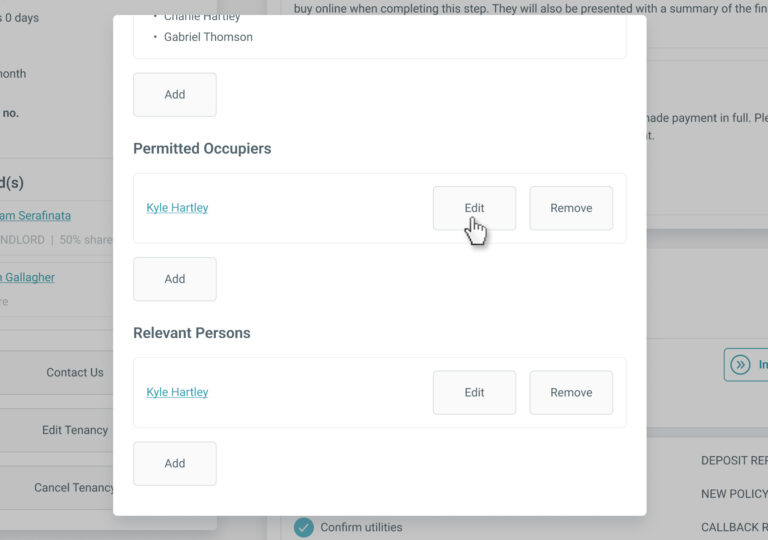
Edit Permitted Occupier Details

The permitted occupier’s details can be edited any time up until ‘Step 5 – Prepare Tenancy Documents’ is complete on BOX.

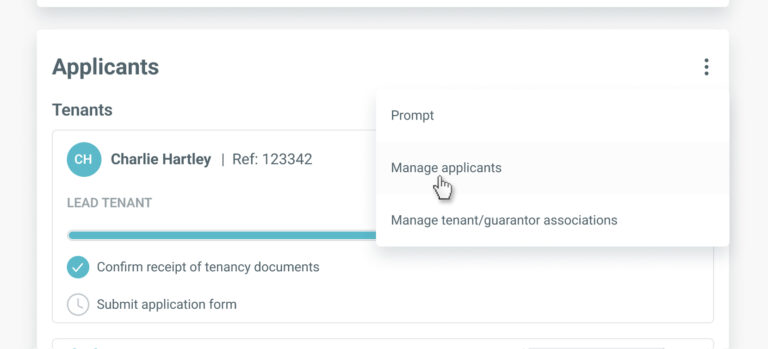
To edit a permitted occupier’s information, go to the ‘Applicants’ section on the tenancy record and select ‘Manage applicants’ from the menu.

In the ‘Manage Applicants’ screen, click the ‘Edit’ button for the permitted occupier you wish to update.

You’ll be directed to the ‘Edit Permitted Occupier’ screen. Update the details as required and click ‘Save’ to apply the changes.

Are you boxing clever yet?

Book a demo

Find out how BOX can help you save time, reduce admin and let properties faster.

    Fill in your details below and we’ll be in touch shortly to arrange the best time show you how we can give you more time to focus on what you do best whilst Box takes care of the rest.

    Thanks for your interest. If you need some help with your referencing or other services, please check out the Tenants area of our website here. If you still need some assistance, drop us a message and our Tenant Support team will be happy to help.

    Thanks for your interest in Box. If you need some help with your insurance policy or other services, our Landlord Support Team will be happy to help. Please call us on 0345 450 9903 or send us a message.

    Next