Prompt Applicants
Tenants, guarantors and relevant persons will receive regular, automatic reminders when there is an action they need to take in order to progress the tenancy.
If however you want to send an extra additional prompt to the applicant, you can do so from the ‘Applicants’ section of the tenancy record.
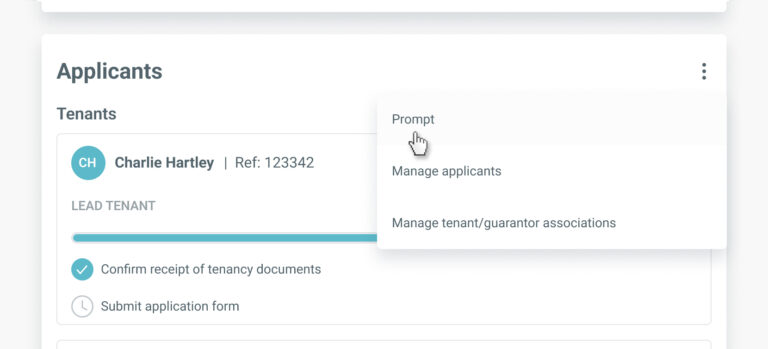
Go to the ‘Applicants’ menu and select ‘Prompt’ from the menu.
Email prompts
This will open a window list all applicants that currently have a task to complete, along with the email address associated with that applicant. All applicants will be selected by default so if you wish to send a prompt to them all just click ‘Send prompt email’ and an email reminder will be instantly sent to all applicants.
If you want to send a reminder to only the selected applicant(s), click ‘Select all’ to de-select this option and then select which applicants you wish to receive a prompt.

Telephone prompts
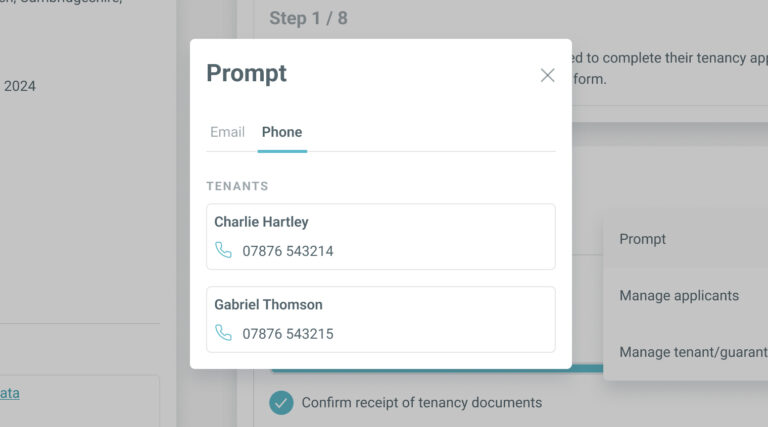
If you’d prefer to call the applicants, BOX provides you with quick access to their phone numbers. Click the ‘Phone’ tab in the ‘Prompt’ window to see the phone numbers of all tenants, guarantors and/or relevant persons who currently have an outstanding action to complete.