Remove Relevant Person

You can remove a relevant person from the tenancy at any time up until ‘Step 5 – Prepare Tenancy Documents’ has been completed on BOX.

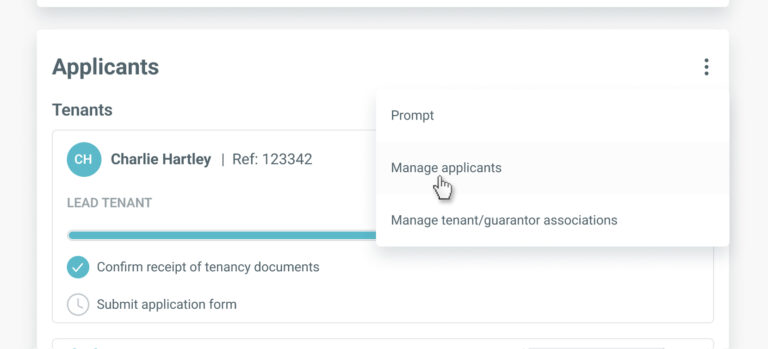
To remove a relevant person from the tenancy, go to the ‘Applicants’ section on the tenancy record and select ‘Manage applicants’ from the menu.

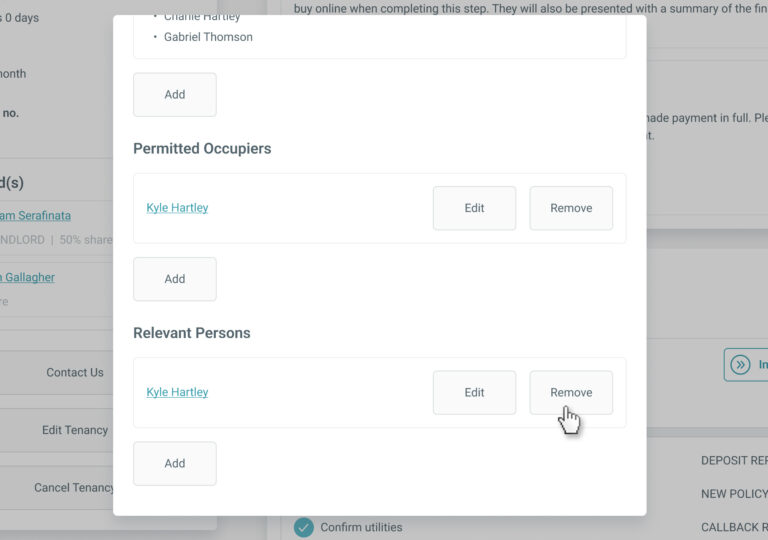
In the ‘Manage Applicants’ screen, click the ‘Remove’ button for the relevant person you wish to remove from the tenancy.


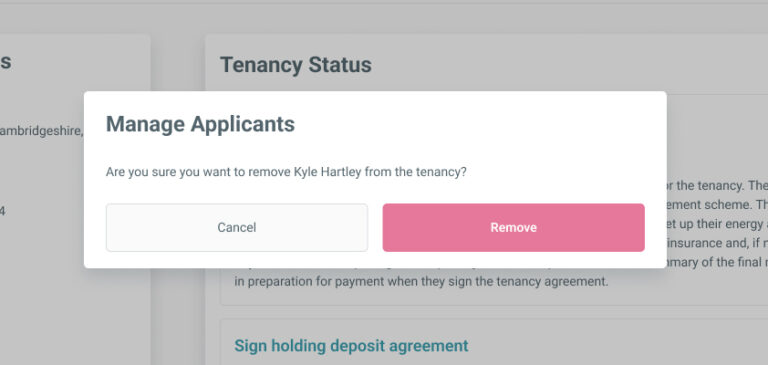
Confirm you wish to remove the relevant person and they will no longer appear in the ‘Applicants’ section of the tenancy page or when completing Steps 3 and/or Step 5 on BOX.

This will close in 0 seconds

TALK TO US TODAY!

Book a no-obligation demo of BOX and explore its full capabilities. Built for today and ready for 2026 and beyond.


RRA Pop Up Form

This will close in 0 seconds

Solverwp- WordPress Theme and Plugin

Are you boxing clever yet?

Book a demo

Find out how BOX can help you save time, reduce admin and let properties faster.

    Fill in your details below and we’ll be in touch shortly to arrange the best time show you how we can give you more time to focus on what you do best whilst Box takes care of the rest.

    Thanks for your interest. If you need some help with your referencing or other services, please check out the Tenants area of our website here. If you still need some assistance, drop us a message and our Tenant Support team will be happy to help.

    Thanks for your interest in Box. If you need some help with your insurance policy or other services, our Landlord Support Team will be happy to help. Please call us on 0345 450 9903 or send us a message.

    Next