
Edit Tenancy
You can make limited changes to the tenancy details depending on how far the tenancy has progressed. You will not be able to make changes to some of the fundamental tenancy details later in the pre-tenancy process as this could affect the legal documents that have already be issued to the tenants.
Any changes to the tenancy details made here will NOT automatically update any existing insurance covers for this tenancy.
To edit a tenancy, clicking the ‘Edit Tenancy’ button within the ‘Tenancy Details’ section of the tenancy record.

You’ll be directed to the ‘Edit Tenancy’ screen where you can make changes to the following:
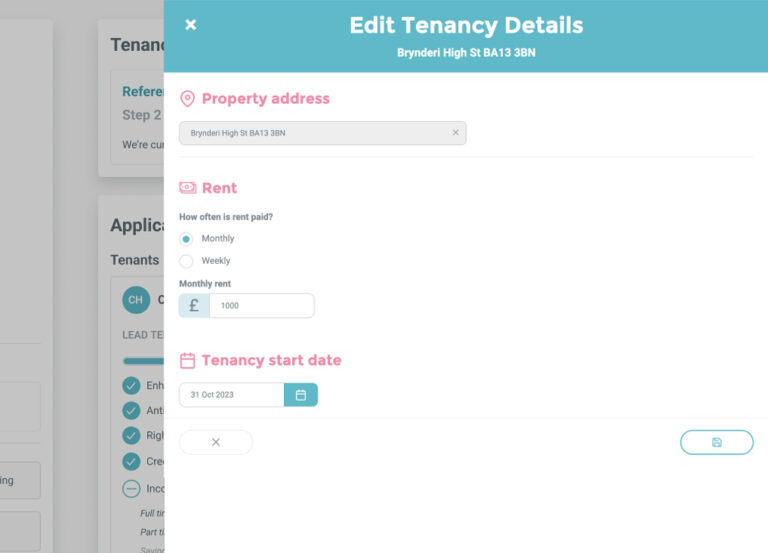
Address
The tenancy address can be changed at any time until ‘Step 3 – Tenancy Acceptance’ on BOX is complete. The new address will be reflected in any referencing reports where the final report was first issued within the last 30 days.
Rent
The tenancy rent value can be changed until ‘Step 3 – Tenancy Acceptance’ on BOX is complete. Rent shares for tenants and guarantors will NOT be automatically updated as a result of any changes to the rent made here but can be changed as normal via the ‘Edit Rent Shares’ button on your dashboard.

The new rent and rent shares will be reflected in any referencing reports where the final report was first issued within the last 30 days.
Tenancy Start Date
The tenancy start date can be changed at any time, however any changes made after Step 5 complete will display onscreen but will NOT automatically update the tenancy agreement.