You can change the tenant(s) linked to a guarantor at any time.
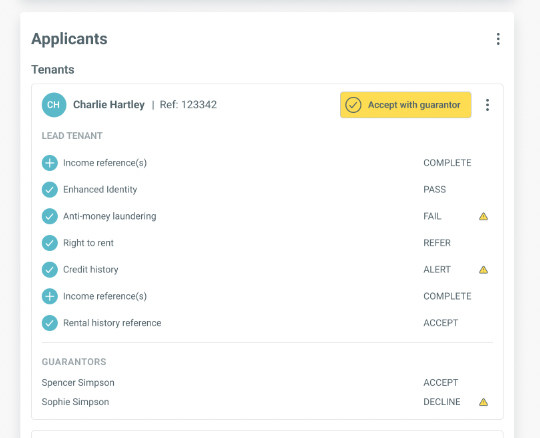
To do so, go to the ‘Applicants’ section on the tenancy page and click the ‘More’ button. Select ‘Manage tenant/guarantor associations’ from the menu.
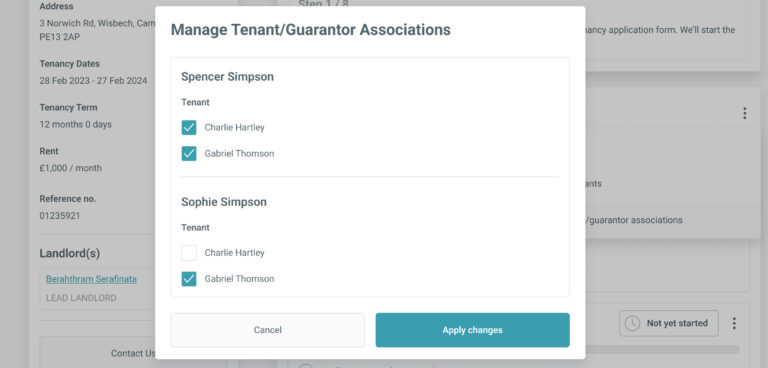
In the ‘Manage Tenant/Guarantor Associations’ screen all guarantors for the tenancy will be listed and all tenants will be listed under each guarantor.
To associate a tenant with a guarantor tick the checkbox.
When you have applied the changes, the tenants and their new guarantor associations will be reflected in the ‘Applicants’ section of the tenancy record.
If you have requested reference checks for a guarantor, the guarantor’s rent share will automatically be updated to reflect the combined total rent share of all tenants you have associated with the guarantor. You can amend these rent shares from your dashboard at any time.
By continuing to browse the site you are agreeing to our use of cookies
Are you boxing clever yet?
Book a demo
Find out how BOX can help you save time, reduce admin and let properties faster.