
View Referencing Status
To see the latest status of your reference checks, in the ‘Applicants’ section of the tenancy record you’ll find the status of all requested checks for all tenants and guarantors. These status and results of these checks will be displayed here until ‘Step 3 – Tenancy Acceptance’ is complete.
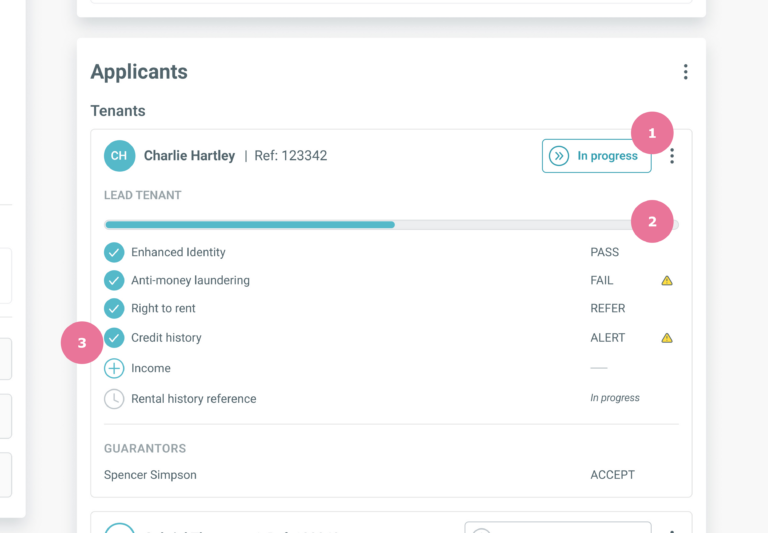
1. Overall status
Each applicant will have an overall status. Before all reference and Know Your Customer checks are complete this will have a status of ‘In progress’.
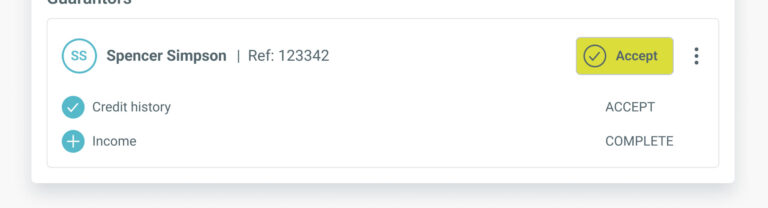
When all checks are complete, the status will update to ‘Complete’ for Essential/Essential+ reports or Uncertified/Uncertified+ Property PassportsTM where no recommendation is given.
For Essential++/Elite reports and Uncertified++/Certified Property PassportsTM where a recommendation is given, the status will update with the overall final recommendation when all checks are complete. Please be aware this result is currently based on reference checks only and does not reflect the results of Know Your Customer (KYC) checks.
2. Progress tracker
Before the checks have been completed, a progress bar will display for each applicant providing a visual indication of how far through the referencing process they are.
3. Progress of individual checks
Every check requested for each applicant will also be listed here. This list will vary depending on the checks and report type selected for the applicant but can include:
Enhanced identity (KYC check)
Anti-money laundering (KYC check)
PEPs & Sanctions (KYC check)
Right to rent (KYC check)
Credit history (Reference / Property PassportTM check)
Income (Reference / Property PassportTM check)
Rental history (Reference / Property PassportTM check)
When each check is complete, the result will be displayed next to the relevant check.
For KYC checks this will be either ‘PASS’, ‘REFER’ or ‘FAIL’ which reflects the result that will display on the report for each check.
For Reference / Property PassportTM checks, this will display as:
‘In progress’ until we have received the reference from a referee or documents/open banking data from the applicant.
‘Verifying’ when we have received the reference from a referee or documents/open banking data from the applicant and we are in the process of completing final verification checks on the information received.
‘Cancelled’ if the individual check has been cancelled.
‘Accept’ if all information is acceptable and does not indicate any adverse factors.
‘Alert’ if the information indicates a potential risk or cannot be verified.
‘Cannot obtain’ if we have been unable to obtain the required information from the referee or the applicant to complete this check.
‘Cannot verify’ if we have received information but have been unable to verify it is genuine.
As applicants can submit multiple income sources for us to verify, ‘Income’ will have an overall status that will show as ‘Complete’ when all income sources have been checked.
To view the status of each of these individual checks, click on ‘Income’ in the list of checks which will expand to reveal all income sources submitted by the applicant and their status.

You can access the reference reports, including any interim reports, via the tenant or guarantor’s individual menu.
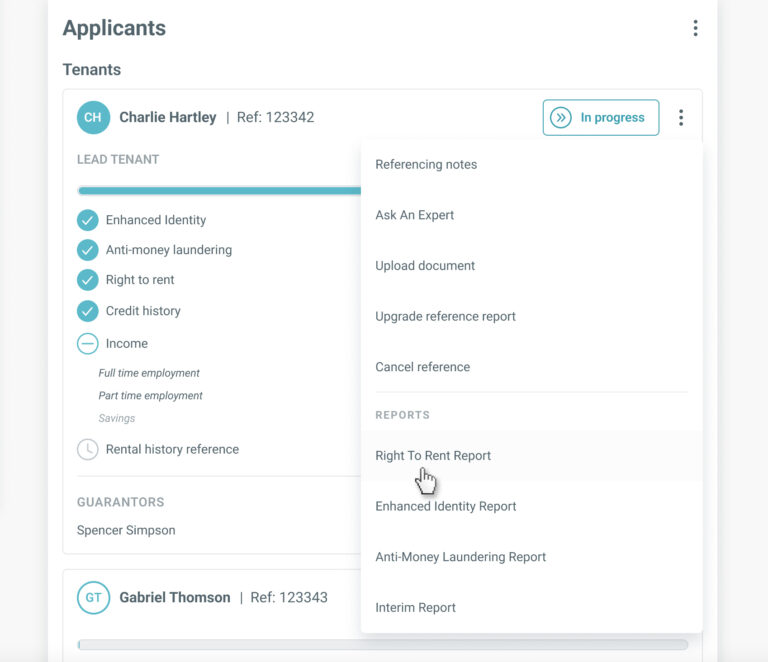
If you need more detail or want to see the history of the activity relating to the reference checks for any applicant, click the applicant’s ‘More’ button and select ‘Referencing notes’ from the menu. This will direct you to the application notes section of the referencing application record.